
Skip to the content
Peregrine KnowledgebasePeregrine Knowledgebase
  • Go to website
  • Go to website
  • Yelp
  • Facebook
  • Twitter
  • Instagram
  • Email

How can we help you?

Popular Search socialheadersocial mediahowsoc

Hester Pro

21
  • Theme Installation
  • Steps after Activating Hester Pro theme
  • Add widgets in sidebar or in Footer widget area
  • Enable front page sections
  • Home Sections
    • Slider Section
    • Info section
    • Service section
    • About section
    • Team section
    • Testimonial section
    • Pricing plan section
    • Call to Action section
    • Gallery section
    • Fun-facts section
    • Feature section
    • Steps to start section
    • Work history / timeline section
    • Workflow section
    • Clients section
    • Extra section
    • Design options

Bloglo Pro & BlogHash Pro common

2
  • Add social media profile links in header
  • Post Formats

ShopWell Pro

59
  • Download & Install ShopWell Addons Plugin
  • How to Install and Activate Required and Recommended Plugins
  • Import Demo
  • Configure Product Images in WooCommerce
  • πŸ”¨ Product Archive Builder
  • πŸ› οΈ Single Product Builder
  • How to change homepage products in the ShopWell free theme?
  • Customizer
    • General
    • Styling
    • Typography
    • Topbar
    • Header
      • Topbar
      • Campaign Bar
      • Header Layout
      • Header specific pages
      • Overriding the Header on Specific Pages
      • Header Builder
      • Sticky Header
      • Header Background
      • Header Elements
        • πŸ” Configuring the Header Search in ShopWell Theme
        • πŸ‘€ Account
        • ❀️ Wishlist
        • πŸ”„ Compare
        • πŸ›’ Cart
        • πŸ“ Custom Text
        • Preferences πŸŒπŸ’±
        • View History
        • πŸ“Œ Primary Menu
        • πŸ“Œ Secondary Menu
        • πŸ—‚οΈ Category Menu
        • πŸ” Hamburger Menu
      • Mega Menu
        • Mega Menu Vertical
        • πŸ” Mega Menu Hamburger
        • 🧩 Configure Mega Menu
        • Mega Menu Horizontal
    • Footer
      • Footer
      • Overriding the Footer on specific pages
  • Elementor
    • βš™οΈ Elementor Basic Configuration Guide
    • Templates
    • πŸ“’ Popup Builder
    • ShopWell Builder
    • Widgets
      • πŸ›οΈ Product Deals Grid / Carousel
  • Pages
    • πŸ“„ Creating a Page
    • βš™οΈ Display Settings
  • Woocommerce
    • πŸ›’ Getting Started with WooCommerce
    • πŸ“„ WooCommerce Pages
    • πŸ›’ Customize the Checkout Page
    • πŸ“¦ Create an Order Tracking Page
    • πŸ‘€ My Account Page Setup in WooCommerce
    • πŸ›οΈ Catalog Mode
  • Shop
    • WishList & Compare
    • πŸ’± Currency Settings
    • πŸ›οΈ Shop Display
    • 🧩 Product Filters
  • Mobile
    • Topbar
    • Header
    • Footer
    • Miscellaneous
  • Translation
    • Quick Start Guide: TranslatePress

Blogsy Lite

15
  • Installation and Demo Import
  • Customizer : General Options
    • General (Logo, colors, typography and misc)
    • Top bar
    • Header & Footer
    • Blog page / Archive and Single Post
    • Sidebar
    • Breadcrumbs and Dark Mode
  • Video Tutorials
    • Video Tutorials
  • Customizer: Home sections
    • Highlight Breaking News with the Ticker Section
    • Hero Section – Featured Post Slider or Custom Hero Content
    • Stories
    • Featured Category
    • Featured Links
    • Posts You Might Like
    • Advertisement

Blogsy Pro / Blogsy Addons

14
  • Blogsy Addons Requirement
  • Installation
  • Install plugins
  • Import Demo
  • Create Header & Footer
  • Setting Up Menus
  • Setting Up the Mobile Menu
  • Setting Up a Mega Menu
  • Creating a Custom Archive Page
  • Display Related Posts
  • Sidebar layout & sticky sidebar
  • Post Layout & Post Format
  • User Avatar and Social Profiles
  • AMP support in Blogsy Pro
  • Home
  • Docs
  • How to change homepage products in the ShopWell free theme?
View Categories

How to change homepage products in the ShopWell free theme?

If you’ve imported the demo content using the Hester Core plugin, the homepage may display dummy products as part of the demo setup.

πŸ“Œ To learn how to import the demo, follow this guide:
How to Import the Demo Β»

Step 1: Add Your Own Products #

To replace the demo products with your own:

  1. Go to Products > Add New in your WordPress dashboard.
  2. Add product details (title, price, images, etc.)
  3. Click Publish

Once added, your products will be available to display on the homepage.

Step 2: Edit the Homepage in Elementor #

  1. Open your homepage in Elementor
  2. Locate the product section

πŸ”„ Old Method (Shortcode-Based) #

Previously, the ShopWell free theme relied on WooCommerce shortcodes like:

[featured_products limit="4" columns="4"]

You could modify it like:

  • Latest Products β†’ [recent_products limit="8" columns="4"]
  • Category Products β†’ [product_category category="t-shirts" limit="6" columns="3"]
  • Sale Products β†’ [sale_products limit="4" columns="4"]
  • Best Sellers β†’ [best_selling_products limit="4" columns="4"]

You can customize the limit, columns, and category values as needed.

πŸ‘‰ This method still works, but it’s no longer required.

✨ New & Recommended Method (Using Hester Core Widgets) #

With the Hester Core plugin, you now get 13 advanced Elementor widgets, allowing you to create product sections directly in Elementor β€” no shortcode required.

βœ… Key Benefits #
  • No coding or shortcode needed
  • Drag & drop product sections
  • Advanced layout and styling control
  • Dynamic product filtering (category, sale, etc.)
  • More flexible and modern design options

🧩 Available Elementor Widgets (Hester Core) #

You can now use these widgets directly inside Elementor:

πŸ“Έ Example: Hester Core Widgets in Elementor Editor
(All available widgets visible in the Elementor panel.)
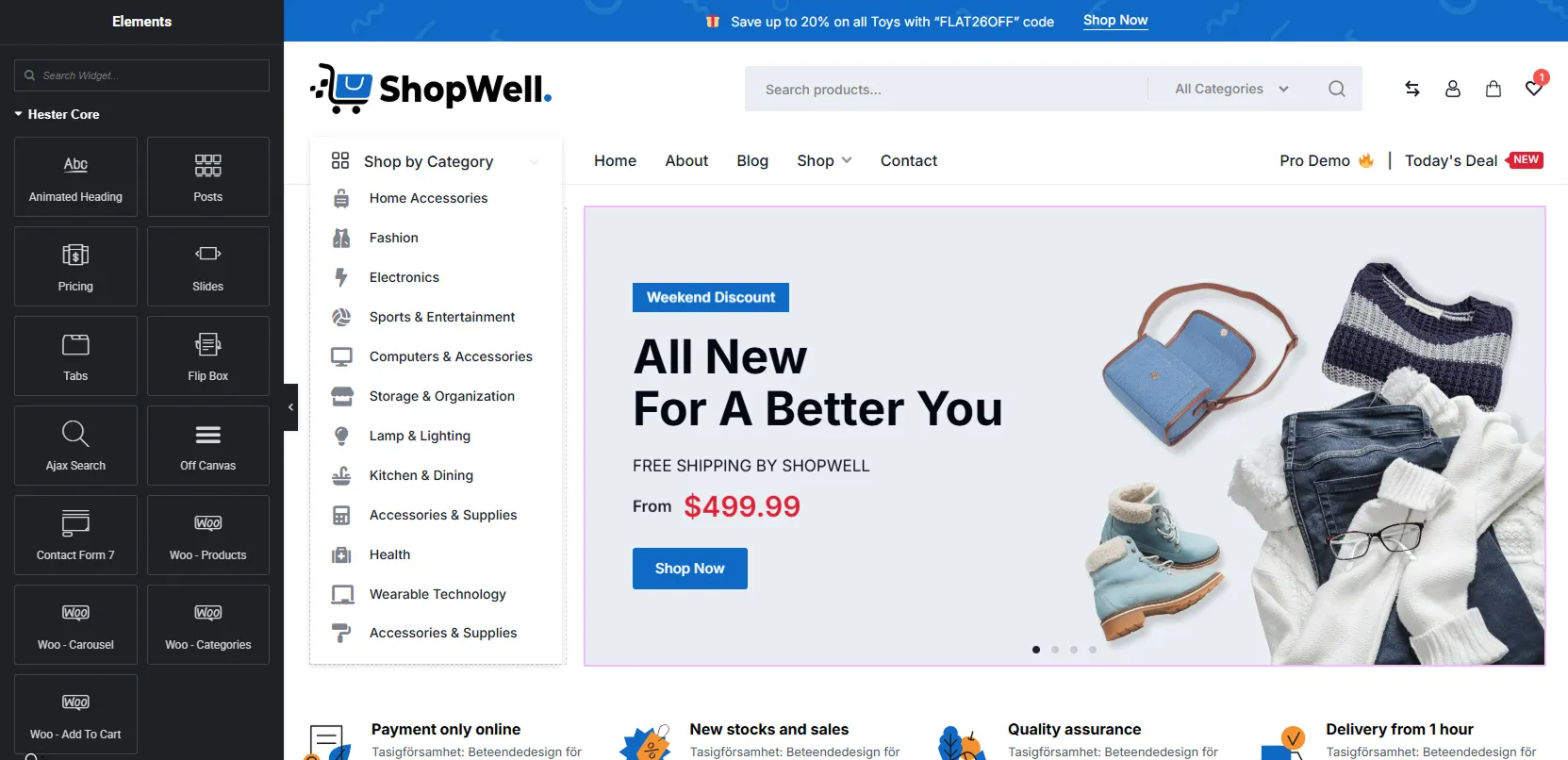
These widgets allow you to build fully dynamic sections like product grids, sliders, category sections, and more directly inside Elementor.

🎯 General Widgets #
  • Animated Heading – Create headings with animated text effects
  • Ajax Search – Live search for products, posts, or pages
  • Slides – Create advanced hero sliders
  • Posts – Display blog posts in a grid or list
  • Pricing – Create pricing tables
  • Flip Box – Interactive front/back content box
  • Contact Form 7 – Style your contact forms
  • Off Canvas – Slide-in panels for menus or content
πŸ›’ WooCommerce Widgets (No Shortcodes Needed) #
  • Woo – Products β†’ Display products grid directly
  • Woo – Categories β†’ Show product categories
  • Woo – Carousel β†’ Create product sliders/carousels
  • Woo – Add To Cart β†’ Add specific product button
  • Tabs β†’ Content tabs with WooCommerce shortcode support, allowing you to create filter-based product tabs (Latest, Sale, Category-wise) directly inside Elementor.

πŸ†• How to Add Products Without Shortcode #

  1. Open homepage in Elementor
  2. Drag “Woo – Products” widget Choose:
  3. Choose:
    • Product source (latest, featured, sale, category)
    • Number of products
    • Columns layout
  4. Customize styling (spacing, colors, typography)

πŸ‘‰ That’s it β€” no shortcode required anymore.

🎨 Advanced Section Building #

Using Hester Core widgets, you can now create the following:

  • Custom product grids
  • Interactive product sliders
  • Category-based sections
  • Hero banners using Slides widget
  • Fully dynamic homepage layouts

πŸ“ Summary #

FeatureOld MethodNew Method (Hester Core)
Add ProductsShortcodesDrag & Drop Widgets
CustomizationLimitedAdvanced
Layout ControlBasicFully Flexible
Ease of UseMediumVery Easy

ShopWell Premium Version #

The ShopWell Premium theme takes your store to the next level with powerful customization and advanced eCommerce features. You get full control over your website design with tools like Header Builder (unlimited header styles), Footer Builder, Mega Menu, Promo Bar, Help Center (for creating documentation), Off-Canvas effects, and enhanced Elementor support for creating professional and flexible layouts.

In addition, ShopWell Premium improves your store functionality with features like multiple Shop and Product page layouts, Product Card customization, Sticky Add to Cart, AJAX Load More, Live Search with suggestions, Recently Viewed Products, Countdown Timer, Daily Deals, Product Variation Swatches, Product Affiliate, Product SIze Guide, Product VIdeo Featured, Product Zoom, 360Β° Product View, and more. πŸš€ Plus, many additional advanced features are included in ShopWell Addons, helping you build a fully optimized and high-converting eCommerce website.

πŸ› οΈ Single Product BuilderDownload & Install ShopWell Addons Plugin
Table of Contents
  • Step 1: Add Your Own Products
  • Step 2: Edit the Homepage in Elementor
  • πŸ”„ Old Method (Shortcode-Based)
  • ✨ New & Recommended Method (Using Hester Core Widgets)
    • βœ… Key Benefits
  • 🧩 Available Elementor Widgets (Hester Core)
    • 🎯 General Widgets
    • πŸ›’ WooCommerce Widgets (No Shortcodes Needed)
  • πŸ†• How to Add Products Without Shortcode
  • 🎨 Advanced Section Building
  • πŸ“ Summary
  • ShopWell Premium Version

© 2026 Peregrine Knowledgebase

Powered by WordPress

To the top ↑ Up ↑