
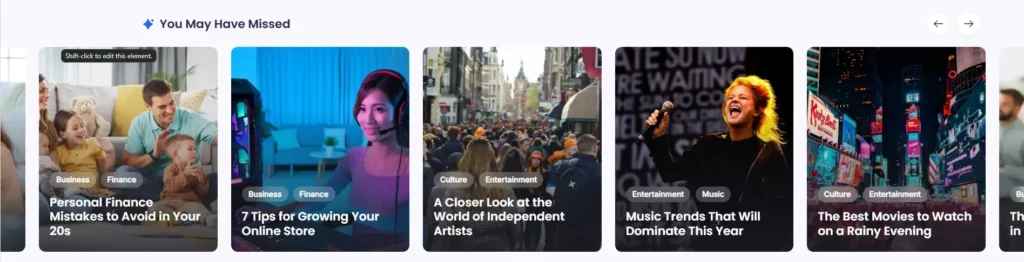
The Posts You Might Like section in Blogsy displays a horizontal slider of recommended posts after the main post feed and before the footer.
It is designed to surface additional content that visitors may have missed, increasing page views and time on site.
Location #
Go to Appearance → Customize → Posts You Might Like.
From here you can enable the section, choose where it appears, and control which posts are included in the slider.
Enable and basic options #
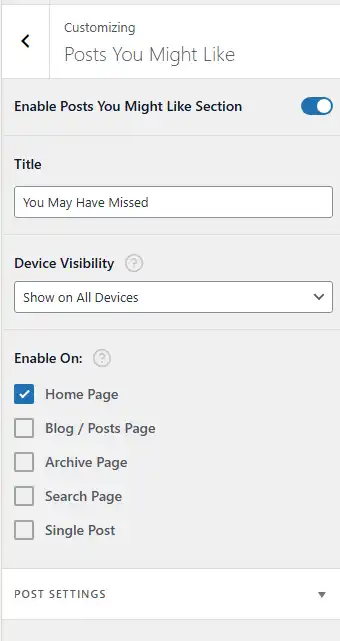
- Enable Posts You Might Like Section
- Turn this on to display the slider on your site.
- When disabled, the section is hidden on all templates.
- Title
- Sets the heading displayed above the slider.
- Example: “You May Have Missed”, “Posts You Might Like”, or “Recommended For You”.
- Device Visibility
- Choose where the section should appear based on device:
- Show on All Devices
- Hide on Desktop / Tablet / Mobile
- Useful if you want to hide the slider on smaller screens.
- Choose where the section should appear based on device:
- Enable On
- Controls on which templates the section appears. Typical options include:
- Home Page
- Blog / Posts Page
- Archive Page
- Search Page
- Single Post
- For example, enabling only Home Page displays the slider under the main post feed of your homepage.
- Controls on which templates the section appears. Typical options include:
The section is output after the main list of posts and before the footer area on the selected templates.
Post Settings #
The Post Settings panel lets you control which posts are pulled into the slider.
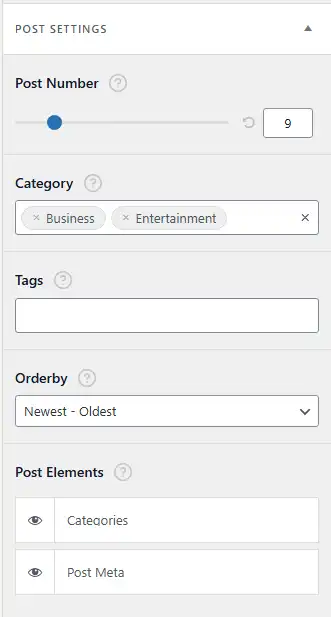
- Post Number
- Sets how many posts appear in the slider (e.g., 6, 9, 12).
- The slider will paginate or scroll through these posts horizontally.
- Category
- Limit the recommendations to specific categories (e.g., Business, Entertainment).
- Leave blank to use posts from all categories.
- Tags
- Further filter posts based on tags if you want a more curated set (for example, posts tagged “featured” or “recommended”).
- Orderby
- Choose how posts are ordered:
- Newest – Oldest (default) to show the latest content first.
- Other order options may be available depending on your implementation (Oldest – Newest, Random, etc.).
- Choose how posts are ordered:
- Post Elements
- Control which elements appear on each post card inside the slider:
- Categories – Displays category badges above the title.
- Post Meta – Shows meta such as author, publish date, or other meta items configured for archives/single posts.
- Toggle each element using the “eye” icon.
- Control which elements appear on each post card inside the slider:
How the slider behaves on the frontend #
- Posts are displayed as large, full‑width cards with featured image backgrounds, overlaid categories, and titles (matching the overall Blogsy card style).
- Navigation arrows let visitors scroll through multiple recommended posts.
- Because the section appears after users have browsed the main feed, it works as a “second chance” to catch their interest and keep them exploring related content.
Use the Posts You Might Like section to automatically highlight extra content your audience will enjoy and reduce the number of visitors who leave after viewing just one page.