
Blogsy Addons provides seamless integration with Elementor, so you can build fully custom headers, footers, sidebars, and off‑canvas layouts using drag‑and‑drop.
Step 1: Create a Blogsy Template #
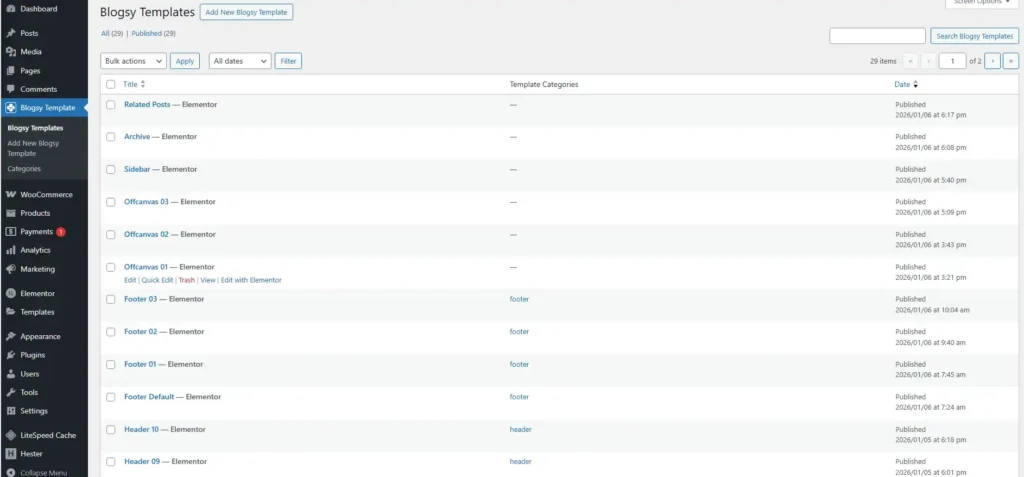
- In the WordPress dashboard, go to Blogsy Templates → Add New Blogsy Template.
- Enter a template name (for example, “Header 10” or “Footer – Shop”).
- From the Categories, choose the appropriate type: header, footer, sidebar, etc.
- Click Edit with Elementor and design your layout:
- Add your logo, navigation, buttons, search, and any other Elementor widgets you need.
- To display your site menu, use Elementor’s Navigation/Menu widget and select the desired WordPress menu.
- Publish the template when you are happy with the design.
Tip: You can create multiple header and footer templates (e.g., default, minimal, landing-page specific) and switch between them from the Customizer or per page.
Step 2: Assign a global header/footer in the Customizer #
- Go to Appearance → Customize → Header.
- Under Preset (or Present), select Build my own instead of the prebuilt header option.
- In Site Header Template, choose your Elementor header from the Blogsy Templates dropdown.
- For single posts, use Single Post Header Template if you want a different header than the global one.
- To make the header sticky:
- Enable Sticky Header in the same panel.
- Select a Site Sticky Header Template (and an optional Single Post Sticky Header Template) from the Blogsy Templates dropdowns.
For the footer:
- Go to Appearance → Customize → Footer.
- Select your preferred Site Footer from the Blogsy Templates dropdown.
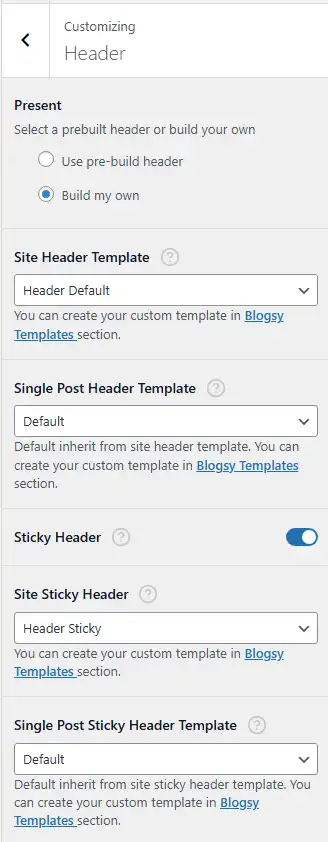
These settings control the global header and footer used across the site.
Step 3: Override header/footer per page #
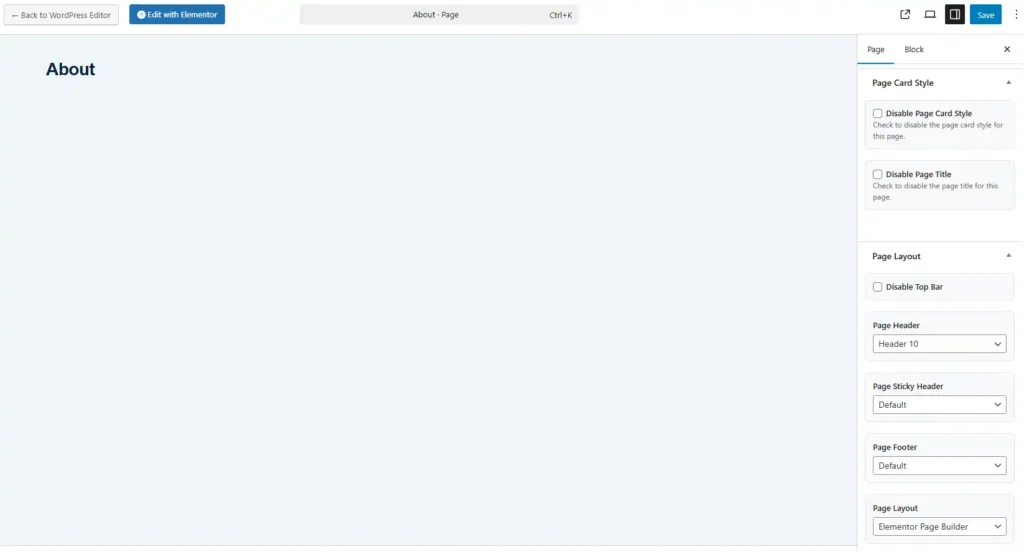
Blogsy Pro also lets you choose a different header or footer on individual pages and posts.
- Edit the page in the WordPress editor.
- In the right‑hand Page Layout meta box (Gutenberg sidebar), locate the template options:
- Page Header – choose a specific Blogsy header template for this page.
- Page Sticky Header – choose a different sticky header if needed.
- Page Footer – select a custom footer template.
- Update the page. That page now uses its own header/footer instead of the global ones.
This setup lets you:
- Use one header/footer for most of the site.
- Apply specialized templates for landing pages, sales pages, or sections like the shop and blog.
- Design everything visually with Elementor while Blogsy handles integration and template assignment.