Blogsy Pro lets you replace the default sidebar with a fully custom Elementor template and also control the global sidebar position.
1. Set the global sidebar position #
- Go to Appearance → Customize → Sidebar.
- For each context (Single Page, Single Post, Blog, WooCommerce, etc.), choose the Sidebar Position: Left, Right, or No Sidebar.
- Publish your changes.
2. Create a custom sidebar template #
- In the dashboard, go to Blogsy Templates → Add New Blogsy Template.
- Name it (for example, “Blog Sidebar”) and assign the sidebar template category.
- Click Edit with Elementor and design your sidebar using widgets.
- Publish the template.
3. Assign the sidebar template #
- Go to Appearance → Customize → Sidebar.
- Select your Elementor sidebar template from the Sidebar Template dropdown.
- Publish.
4. Override sidebar layout per page/post #
You can change the sidebar layout for any individual page or post:
- Edit the page/post in the WordPress editor.
- In the Page Layout meta box (right sidebar), choose a different layout such as Left Sidebar, Right Sidebar, No Sidebar, or No Sidebar + Narrow Content.
- Update the page.
Sticky Sidebar #
Blogsy supports both a global sticky sidebar for the theme’s default layout and a sticky column option inside Elementor templates.
1. Enable theme-level Sticky Sidebar #
- Go to Appearance → Customize → General → Misc Settings.
- Turn on Sticky Sidebar.
- Publish your changes.
This keeps the standard theme sidebar visible while scrolling on supported layouts.
2. Enable sticky column in Elementor sidebars #
- Edit your sidebar or page template with Elementor.
- Create a section with two columns (main content + sidebar) if you are designing a full layout, or simply use a container that represents the sidebar area.
- Select the column/container that should behave as the sidebar.
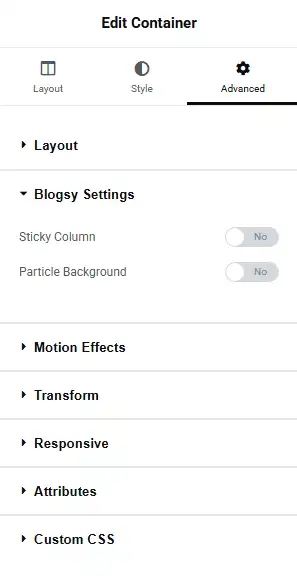
- Go to the Advanced tab → Blogsy Settings panel.
- Enable Sticky Column.
For custom sidebars built with Blogsy Templates and Elementor:
The selected column will now stick while the user scrolls, giving you a modern, persistent sidebar for widgets such as author cards, CTAs, or ads.