
Blogsy Pro is compatible with the official AMP plugin and can serve fast, AMP‑optimized versions of your single posts.
Install and configure the AMP plugin #
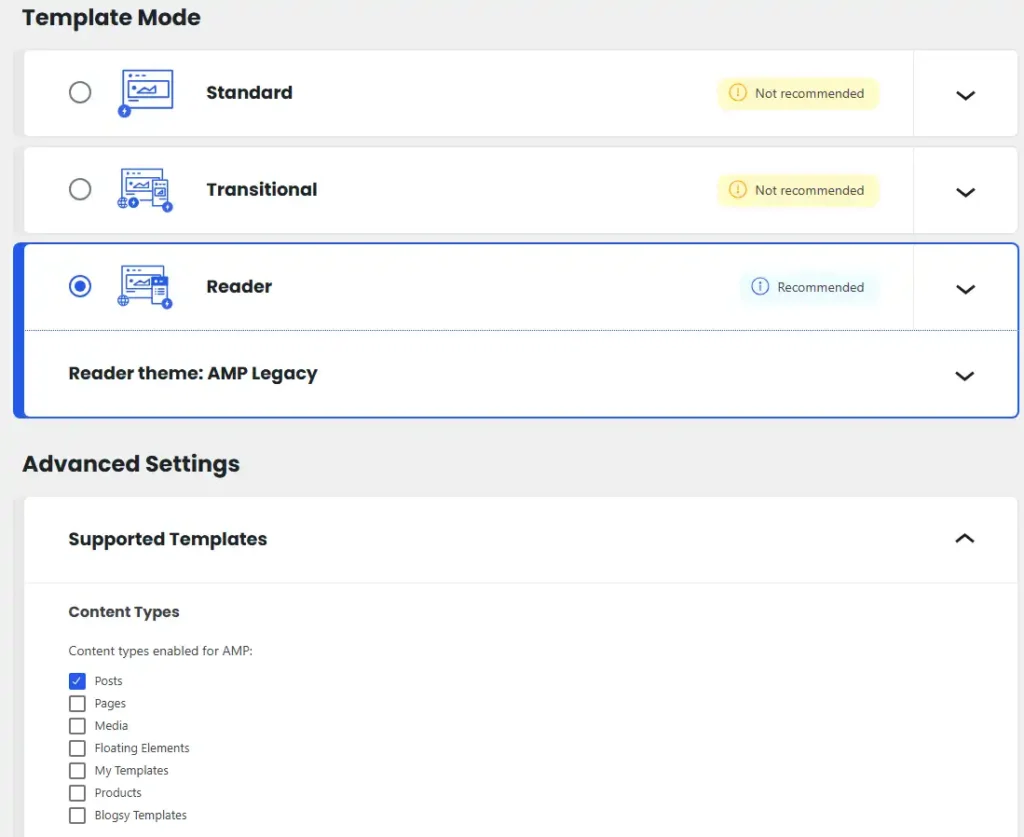
- Install and activate the AMP – WordPress plugin from the WordPress.org repository.
- In the dashboard, go to AMP → Settings.
- For Template Mode, select Reader.
- In Reader mode, choose Legacy Theme as the AMP theme.
- Under Supported Templates, enable Posts (and leave other templates disabled if you only want AMP for single posts).
This setup lets Blogsy use its own simple AMP styles while the official plugin handles AMP generation and validation.
Customize Blogsy’s AMP appearance #
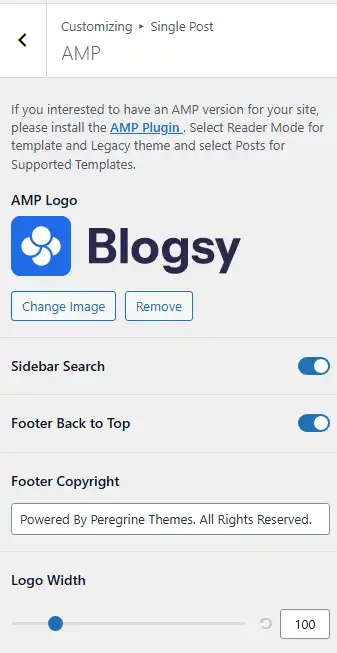
- Go to Appearance → Customize → Single Post → AMP.
- Configure:
- AMP Logo – upload a logo optimized for AMP pages.
- Sidebar Search – toggle a simple search on AMP pages.
- Footer Back to Top – show or hide the back‑to‑top button.
- Footer Copyright – set the copyright text for AMP footers.
- Logo Width – adjust the logo size for better visual balance.
Important AMP limitations #
AMP has strict technical constraints that affect how your site and plugins work:
- Maximum of 75 KB total CSS across the page.
- Custom JavaScript is not allowed; only AMP components and whitelisted scripts can run.
- Many complex plugins (including page builders like Elementor) may not be fully compatible on AMP pages.
Because of these limitations, Blogsy applies a minimal, clean AMP style and cannot guarantee that all third‑party plugins will work correctly in AMP mode.
Recommendation:
Enable AMP only for single posts (as described above) to improve article performance and Page Experience scores while keeping the rest of the site fully functional and visually rich in the non‑AMP version.