
The Breadcrumb and Dark Mode panels in Blogsy help you improve both navigation and reading comfort across your site.
Breadcrumb #
Breadcrumb: Appearance → Customize → Breadcrumb
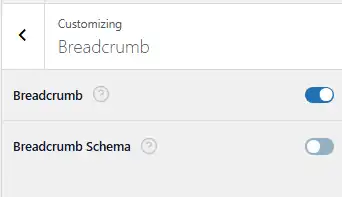
Breadcrumbs display a small navigation trail (for example, Home → Category → Post Title) near the top of your pages and posts.
- Breadcrumb
- Turn this toggle on to enable the breadcrumb trail on supported templates (such as single posts, pages, and archives).
- Breadcrumbs help visitors understand where they are on your site and quickly navigate back to higher-level pages.
- Breadcrumb Schema
- When enabled, Blogsy outputs structured data for breadcrumbs (typically JSON‑LD) in your page markup.
- This can allow search engines to show breadcrumb paths in search results, improving click‑through and overall SEO visibility, especially on large content sites.
If you already use an SEO plugin that outputs breadcrumb schema, keep this option off to avoid duplicate schema.
Dark Mode #
Dark Mode: Appearance → Customize → Dark Mode
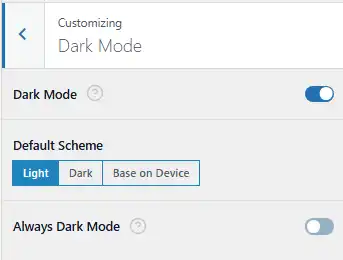
Dark Mode lets visitors switch between light and dark color schemes, reducing eye strain and offering a modern reading experience.
- Dark Mode
- Enable this toggle to activate Blogsy’s dark mode system.
- When enabled, compatible elements of your site will automatically switch between light and dark styles based on the settings below or user choice (if you expose a toggle in the header).
- Default Scheme
- Light – The site loads in the light color scheme by default. Visitors can switch to dark mode if you display a dark mode toggle.
- Dark – The site loads in dark mode by default, suitable for blogs that primarily target night readers or developers.
- Base on Device – Uses the visitor’s system preference (prefers-color-scheme). Users with dark mode enabled at OS/browser level will see your site in dark mode automatically, while others see the light version.
- Always Dark Mode
- When turned on, the entire site stays in dark mode all the time, regardless of the default scheme or visitor/device preferences.
- Use this if you want a permanently dark aesthetic and do not intend to offer a light version.
By combining Breadcrumb and Dark Mode controls, Blogsy gives you both better usability (clear paths through your content) and a more comfortable reading experience for your audience.