
The Sidebar panel in Blogsy controls where the sidebar appears on different page types and how the sidebar container looks (shadow, border, and background).
Location #
- Global settings: Appearance → Customize → Sidebar
- Per‑page/per‑post override: edit any page or post and use the Page Layout meta box in the editor sidebar.
Global sidebar position settings (Customizer) #
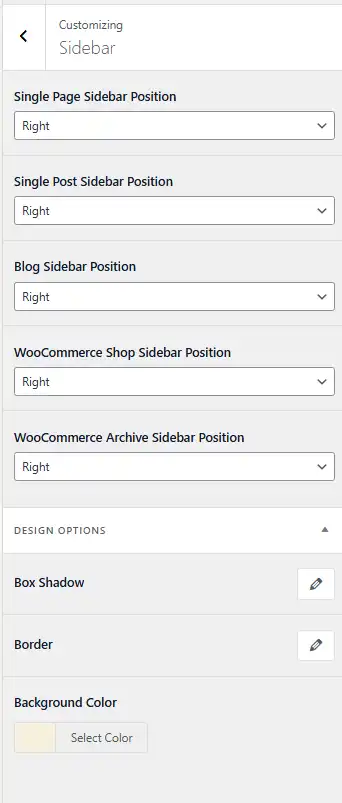
Each dropdown in Appearance → Customize → Sidebar controls the default sidebar position for a specific type of page:
- Single Page Sidebar Position – Default sidebar position for individual Pages.
- Single Post Sidebar Position – Default sidebar position for individual blog posts.
- Blog Sidebar Position – Default sidebar position for the main blog and archive pages.
- WooCommerce Shop Sidebar Position – Default sidebar position for the shop page.
- WooCommerce Archive Sidebar Position – Default sidebar position for product archives.
These defaults are used unless a specific post or page overrides them using the Page Layout meta options.
Page/Post-level override (Page Layout meta) #
On any page or post, you can override the global sidebar setting:
- Edit the page or post in the WordPress editor.
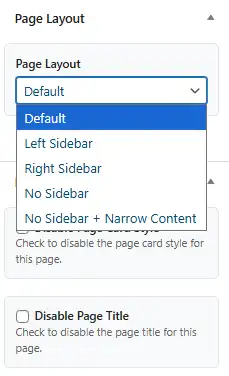
- In the settings sidebar, find the Page Layout meta box.
- Choose one of the following options:
- Default – Uses the global setting from the Customizer (e.g., “Right” from “Single Page Sidebar Position”).
- Left Sidebar – Forces a left sidebar layout for this page/post only.
- Right Sidebar – Forces a right sidebar layout for this page/post only.
- No Sidebar – Removes the sidebar and makes the content area full width.
- No Sidebar + Narrow Content – Removes the sidebar and displays the content in a narrower, centered column (ideal for landing pages, long-form articles, or focused reading layouts).
Using these options, you can keep a global pattern (for example, right sidebar for all posts) while creating special layouts for selected pages like landing pages, portfolios, or long guides.
Sidebar design options #
In Appearance → Customize → Sidebar, the Design Options section lets you style the appearance of the sidebar container:
- Box Shadow – Adds a shadow around the sidebar, creating a card-like effect.
- Border – Adds a border around the sidebar container to visually separate it from the main content.
- Background Color – Sets the background color for the sidebar area; using a light accent color helps widgets (like the author card and Recent Posts) stand out, as shown in the example frontend screenshot.

By combining global sidebar positions, per‑page Page Layout overrides, and design options, Blogsy lets you create consistent layouts while still giving you fine control over important pages and posts.