
Blogsy Pro allows you to design fully custom archive layouts (Category, Tag, Author, Date archives, etc.) using Blogsy Templates + Elementor.
If you do not create a custom template, Blogsy will use the theme’s default archive layout.
Create a Blogsy Archive Template #
- In the dashboard, go to Blogsy Templates → Add New Blogsy Template.
- Give the template a name, such as “Blogsy Archive”.
- Click Edit with Elementor to open the template in the Elementor editor.
Add a Blogsy posts widget and configure the query #
- In Elementor, locate the Blogsy Widgets panel.
- Drag a Blogsy post listing widget (for example, “Post Elastic” or similar blog widget) into your layout.
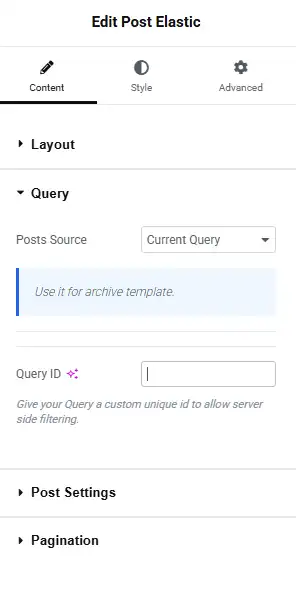
- In the widget’s settings:
- Open the Query section.
- Set Posts Source to Current Query.
- This ensures the archive template uses the category/tag/author being viewed, instead of a fixed list of posts.
- (Optional) Enter a Query ID only if you need advanced server‑side filtering or multiple queries on the same page.
- Enable Pagination inside the widget so visitors can navigate through all posts in the archive.
You can style the layout (grid, list, cards) and spacing from the widget’s Layout and Style tabs.
Add sidebars or extra sections #
To include a sidebar or additional content in your archive template:
- Divide your main section into two columns (for example, 2/3 + 1/3).
- Place the Blogsy posts widget in the wider column.
- In the second column, add widgets such as:
- Recent Posts
- Categories list
- Newsletter form
- Any custom Elementor or Blogsy widgets you like
This gives you a fully custom archive page with both content and sidebar controlled inside Elementor.
Assign the archive template in the Customizer #
- Publish the template in Elementor.
- Go to Appearance → Customize → Blog Page / Archive.
- Look for the Archive Template dropdown.
- Select the Blogsy Template you just created.
- Click Publish to save your Customizer settings.
From now on, Blogsy will use your Elementor‑based template for category, tag, author, and other archive pages, giving you full design control while still respecting the native WordPress query.