
To fully unlock the features and functionality of the Blogsy theme, you need to install and activate a few required and recommended plugins. This guide will show you how to do that quickly and efficiently.
Install and Activate Required and Recommended Plugins #
You can easily install and activate all the required and recommended plugins from the Blogsy settings page.
- Go to Admin Dashboard > Appearance > Blogsy Theme.
- You will see a list of required and recommended plugins. Install and activate them as follows:
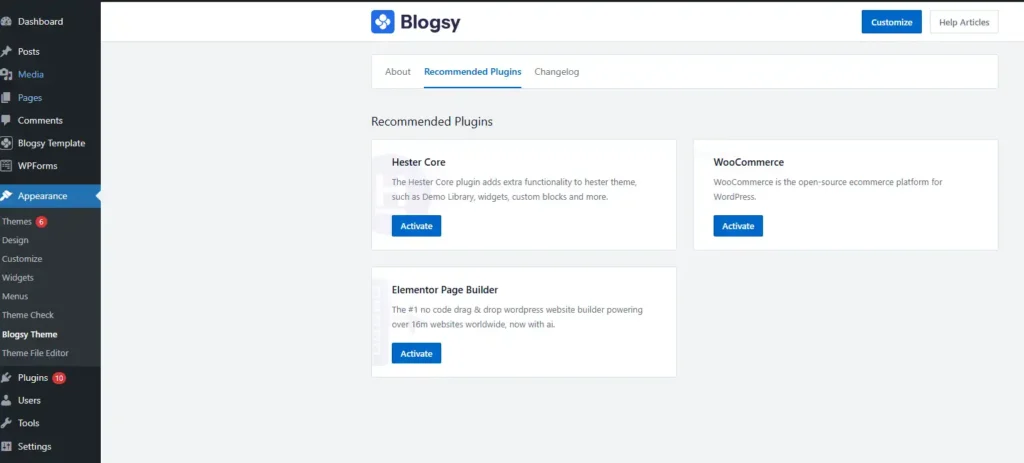
Recommended Plugins:
- Hester Core: Allows you to import any prebuilt demo offer by the theme.
- Elementor: Drag-and-drop page builder to design your website.
- WooCommerce: Adds e-commerce functionality to your site.
- Click the Install button next to each plugin to download and install it.
- Once installed, click the Activate button to enable each plugin.
Note: After activating the Hester Core plugin, there will be a new menu item, Hester, in the dashboard sidebar. From there, you will find the Demo Library option to import a demo.
See how to import a demo
Troubleshooting #
- If you encounter any issues during installation, ensure your WordPress version and server meet the minimum requirements for these plugins.
- Contact our support team at peregrinethemes[at]gmail[dot]com for further assistance.
With these plugins installed and activated, you’ll have all the tools you need to create a fully functional and beautiful blog or magazine website using the Blogsy theme!