
Post Layout options #
Blogsy includes multiple single‑post hero layouts so you can control how each article looks above the content.
Set the default layout for all standard posts #
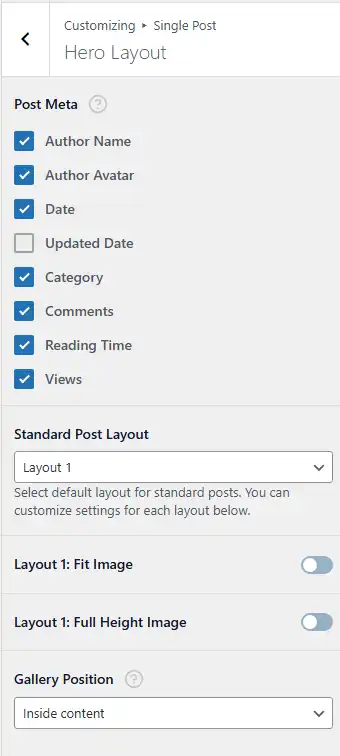
- Go to Appearance → Customize → Single Post → Hero Layout.
- In the Standard Post Layout dropdown, choose your preferred layout (e.g., Layout 1, Layout 2, etc.).
- Optional layout-specific options:
- Layout 1: Fit Image – Adjusts the featured image to fit nicely within the hero area.
- Layout 1: Full Height Image – Expands the hero so the featured image fills a tall, immersive header.
- Configure which Post Meta items appear (Author Name, Avatar, Date, Updated Date, Category, Comments, Reading Time, Views) and the Gallery Position if you use gallery posts.
- Click Publish.
This becomes the global layout for all standard posts, unless overridden on a specific post.
Override the layout on a single post #

- Edit the post in the WordPress editor.
- Scroll down to the STANDARD POST FORMAT meta box.
- In Post Hero Layout, choose a different layout from the dropdown (for example, Layout 2 or Layout 3).
- Update the post.
That post will now use its custom hero layout, while other posts still follow the global layout set in the Customizer.
Post Formats #
Blogsy supports several WordPress post formats so you can present different types of content with appropriate designs and fields.
Supported formats:
- Standard – Default article with featured image, title, and content.
- Audio – For podcast episodes or embedded audio players.
- Video – For posts centered around a video.
- Gallery – For multiple images in a gallery or slider.
- Link – For link‑style posts that highlight an external URL.
- Quote – For quote‑centric posts with stylized quote presentation.
How to choose a post format #
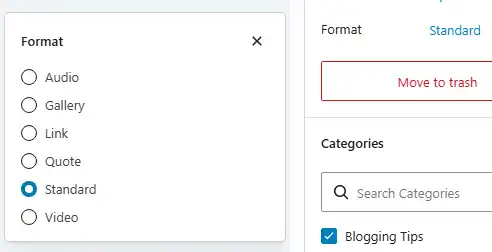
- Edit a post in the WordPress editor.
- In the Post settings sidebar, find the Post Format section.
- Select the desired format (Standard, Audio, Video, Gallery, Link, or Quote).
When you change the format to Video, Link, Quote, Audio, or Gallery, Blogsy will show the corresponding fields for that format—for example:
- Video URL or embed field for Video.
- External URL field for Link.
- Quote text and source fields for Quote.
- Audio embed or file field for Audio.
- Image selection or gallery builder for Gallery.
Fill in these fields and update the post; the front‑end will automatically use the correct layout for the chosen format.